Appearance
Sections & materials
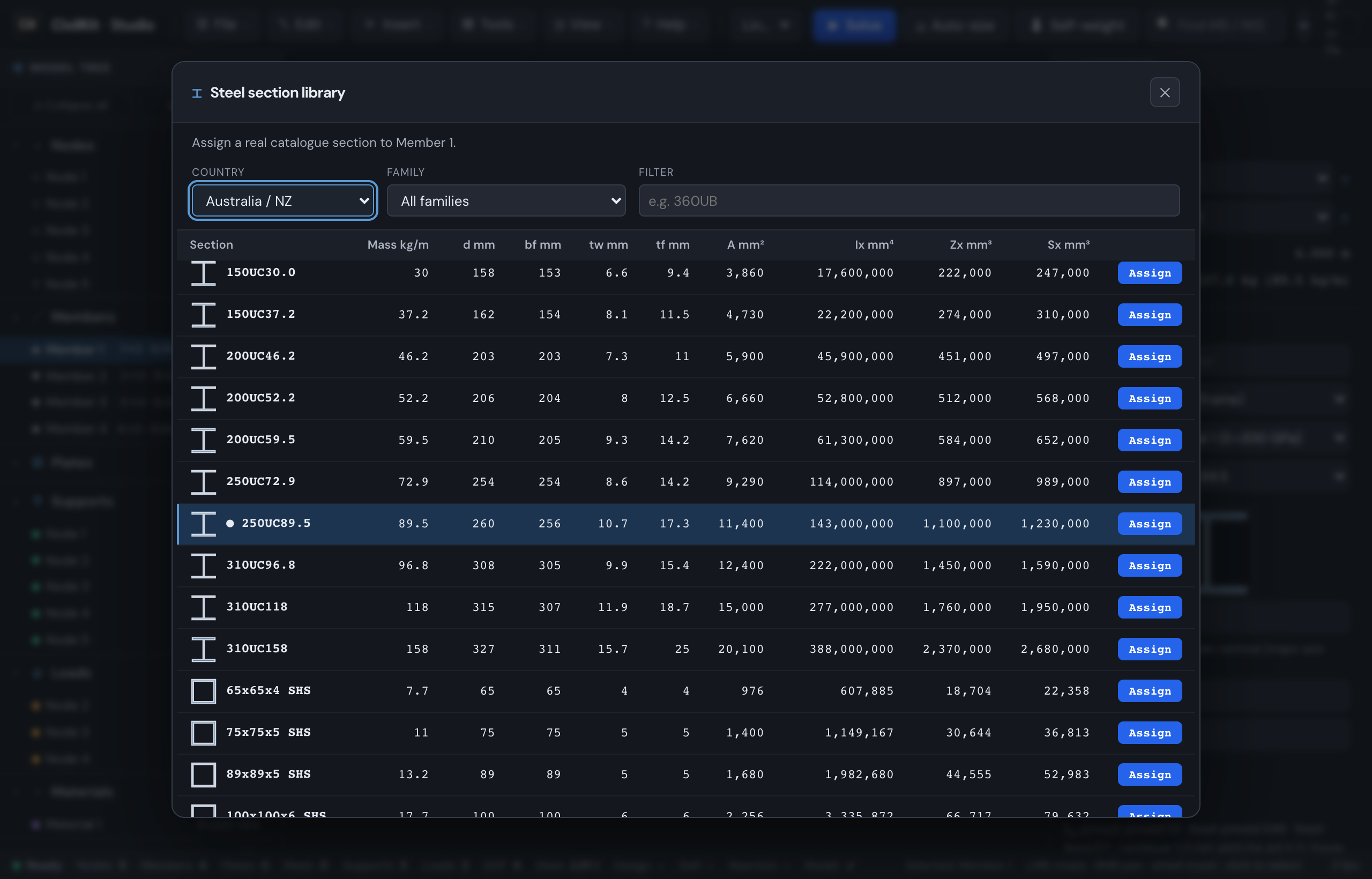
Steel section library
CivilKit Studio ships a real hot-rolled steel section library covering five regions:
| Region | Standard | Designations |
|---|---|---|
| Australia / NZ | AS/NZS 3679.1 / 1163 | UB / UC, PFC, angles, CHS, flats, round bar (ROD12 to ROD36), Lysaght Cees and Zeds |
| United States | AISC | W shapes |
| United Kingdom | BS 4-1 / SCI P363 | UB / UC |
| Europe | EN 10365 | IPE / HEA / HEB |
| Canada | CISC / AISC | W shapes |
Open the section library from a member's inspector ("Browse sections") to pick a real catalogue section. Each section carries area, second moments (Ix/Iy), plastic and elastic moduli, and torsion constant J.
Verify before professional use
The catalogues are marked verified: false - they are indicative for early-stage analysis. Every value should be cross-checked against a current manufacturer catalogue and the governing standard before professional use. (An internal consistency check guards the data: Zx = Ix/(d/2), plastic > elastic, and mass = ρ·A all hold across the 275 sections.)
Round bar rods
The Round Bar family (ROD12 to ROD36, Grade 300) covers rod bracing. A rod carries no compression: the shed generators and Add bracing make a rod tension-only by default, and a rod left as an ordinary beam is checked for buckling on a section that cannot provide it. The AS 4100 tension check uses the gross area; the reduced tensile-stress area at a threaded end (AS 1275, about 0.78 Ag for these sizes) belongs to the end connection and is not applied by the member check.
Concrete columns (generic)
Concrete columns aren't a discrete rolled catalogue - the size is continuous - so the library offers them as parametric solid shapes rather than thousands of named rows. In the section library's catalogue dropdown, pick Concrete (generic):
- Rectangular (solid
D × B) and Circular (solid⌀D) columns, with exactA / Izz / Iyy / Jcomputed from the dimensions. - A preset ladder of common sizes - squares 300→1000, a few blades (200×900, 300×1200), and rounds off the 75 mm formwork ladder (450, 525, 600, 675, 750, 900…). Use the shape family filter to narrow to rectangular or circular.
- A Custom size… row - switch to Rectangular or Circular and type any
width × depthor diameter in millimetres.
Assigning a concrete section also sets a concrete material for the member, so the analysis uses concrete stiffness and self-weight - not steel.
Grade follows your region
The Grade picker defaults to the concrete grade for your active design region, and each grade carries that code's elastic modulus:
| Region | Default grade | Code | E |
|---|---|---|---|
| AU / NZ | N40 | AS 3600 | 32.8 GPa |
| Europe / UK | C40/50 | EC2 Ecm = 22(fcm/10)^0.3 | 35.2 GPa |
| United States | 5000 psi | ACI 318 Ec = 4700√f'c | 27.6 GPa |
| Canada | 35 MPa | CSA A23.3 | 28.2 GPa |
Change the design region and the default grade (and its E) follows - you never get N40 in a US model. Pick a different grade from the same list to override it.
Section properties in the inspector
Select a member and the inspector shows a compact Section properties readout under the section picker: mass/m, depth, A, Ix (major), Iy (minor), Zx, Sx, J. Values come from the catalogue geometry (in mm units) where available, or are converted from the analysis values for a generic section. It is the quick "what are this section's numbers?" check engineers reach for constantly - and confirms, after solving, that a member is bending about the axis you intended (see Member orientation).
Isolate this section
The member inspector also offers "Isolate this section" - it shows only the members that share the selected section (and their nodes), hiding everything else. It is the fast "show me just the 360UBs" view. Show all (A), or selecting anything, restores the full model. The steel take-off rows are clickable too: a click selects and frames a representative member of that section.
Building custom sections
The Sections module (pick it from the suite bar) is a parametric section builder. Choose a shape, type its dimensions, and it computes the full property set live and draws the profile.
Parametric shapes
Ten shapes are built in:
| Shape | Notes |
|---|---|
| Rectangle, Circle | Solid |
| CHS, RHS | Hollow circular / rectangular |
| I-section | With root radius R1, toe radius R2, and flange taper |
| Channel (PFC) | |
| T-section | Optional root radius |
| Angle (L) | Equal or unequal, with root + toe radii |
| Cruciform | |
| Monosymmetric I | Separate top / bottom flange widths (Bt/Bb) and thicknesses |
Property readout
The editor shows the full set of computed properties, not just the headline numbers: area, mass/m, centroid, Ix, Iy, product of inertia Ixy, principal I1/I2 and their angle, section moduli Zx/Zy, radii of gyration, torsion J, and warping Iw. For an asymmetric shape (an angle, or a monosymmetric I) the principal axes and Ixy are where the real behaviour shows up.
Property factors
Open Property factors in the editor to scale a section's area, major/minor inertia, or torsion by an independent multiplier (1.0 = unchanged). Useful for a cracked-concrete stiffness knock-down or a built-up member. The factors are saved with the section and restored when you re-edit it.
Families
Custom sections are organised into families. Drag a section from one family onto another to move it, and click a section to load it back into the editor to re-edit (the button becomes Update section). Custom families also appear in the member section picker under Custom.
Materials tab
The Materials tab lists the standard materials (steel, concrete grades, aluminium, timber) with their E, Poisson, density, thermal coefficient and f'c, and lets you add or remove your own custom materials.
Export & import
Export downloads your custom families and materials as a JSON file; Import merges a file back in (existing entries are never overwritten). It is the way to back up or share a library between machines.
Defining a section directly
A section is just its analysis properties (SI):
json
{ "id": 1, "a": 0.0113, "iyy": 1.43e-4, "izz": 4.85e-5, "j": 3.4e-7 }izz is the major axis (strong), iyy the minor axis. See the model schema for the full picture.
Materials
json
{ "id": 1, "e": 200e9, "g": 80e9, "nu": 0.3, "rho": 7850 }Young's modulus e, shear modulus g, Poisson nu (needed for plate bending), and density rho (self-weight + modal mass). nu/rho default to 0.3 / 7850 if omitted.