Appearance
User Guide
CivilKit Studio is a browser-based 3D structural analysis tool. It runs entirely in your browser - the finite-element solver is compiled to WebAssembly, so models solve locally with nothing sent to a server.
What you can do today
- Start fast from a parametric template (a continuous beam, portal frame, truss, building frame, floor grid, arch, lattice tower or dome) and read a live steel take-off as you model.
- Model beams, trusses and plate/shell elements in 3D (modelling), with member releases/offsets, real sections from a 6-region steel library (AU / US / UK / EU / CA / TH) plus cold-formed and timber catalogues, the β orientation convention, editing tools and undo/redo (Ctrl+Z) on every edit.
- Apply loads: nodal, member UDL / point / trapezoidal, one-click self-weight, springs & settlements, multiple load cases, factored load combinations, and code load generators (AS/NZS 1170 wind / snow / earthquake + notional).
- Analyse: linear static, P-Delta (second-order), buckling, modal, and dynamic (response spectrum, time history, influence lines).
- Design steel: per-member capacities + combined-action utilisation to AS 4100 with auto-sizing, plus international codes (AISC 360 / EC3 / AS 5100 / EIT), cold-formed AS 4600 (DSM) and timber AS 1720.
- Design connections (base / fin / end plate, AS 4100, maturing), concrete & composite (AS 3600 RC + AS 2327), and standalone calculators (slab, beam, footing, retaining wall, bolt & weld)
- demands pulled straight from the analysis.
- Interpret results: reactions, member forces, displacements and plate forces (kN, mm); deflection/stress contours and a colour-by-utilisation view; N/V/M force diagrams drawn on the whole model; an animated deformed shape and mode shapes.
- Report & share: a printable, auditable PDF report with the Report Designer (presets, detail levels), fabrication schedules (joint schedule + worksheet), import / export (JSON / DXF / DWG / SpaceGass / SAF / IFC), a share link + cloud versions, copy results to Excel (TSV), and a scripting API.
- Stay where you left off: your model, panel layout and view settings persist across a refresh - and everything runs offline in your browser.
Layout
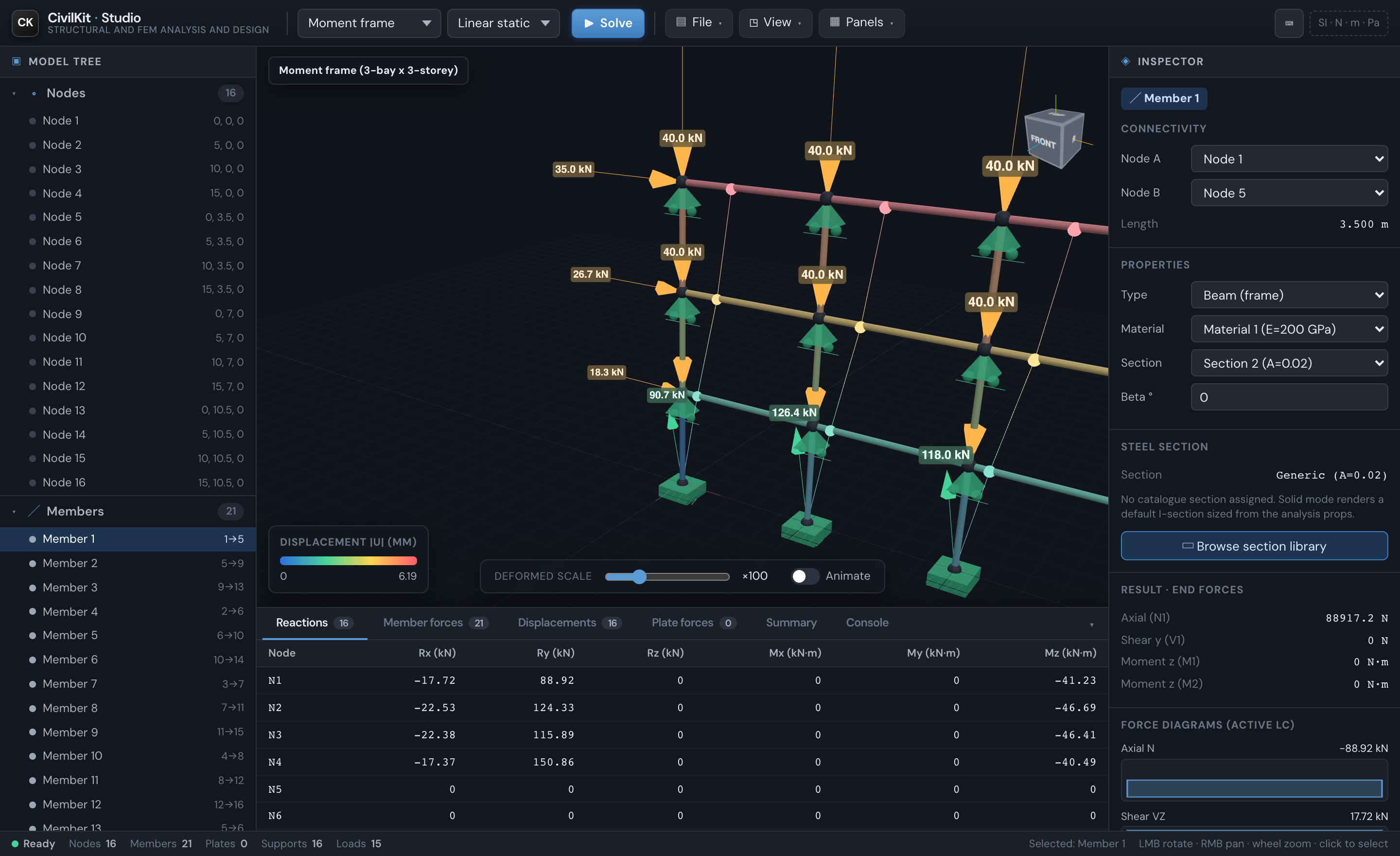
| Area | What it does |
|---|---|
| Top toolbar | Model gallery, analysis-type selector, Solve, and File / View / Panels menus |
| Model tree (left) | Browse nodes, members, plates, supports, loads, materials, sections |
| Viewport (centre) | 3D model; orientation cube (drag to orbit, click a face/edge/corner to snap) |
| Inspector (right) | View/edit the selected node, member or plate; per-member force diagrams |
| Results panel (bottom) | Reactions, member forces, displacements, plate forces, summary, console |
New here?
Start with Getting started and the Studio interface tour, generate a model from a template, then read Analysis & results and Design checks. Want to know what to trust? See Verification & validation; for what is not built yet, What's not in CivilKit.