Appearance
Load generators (AS/NZS 1170)
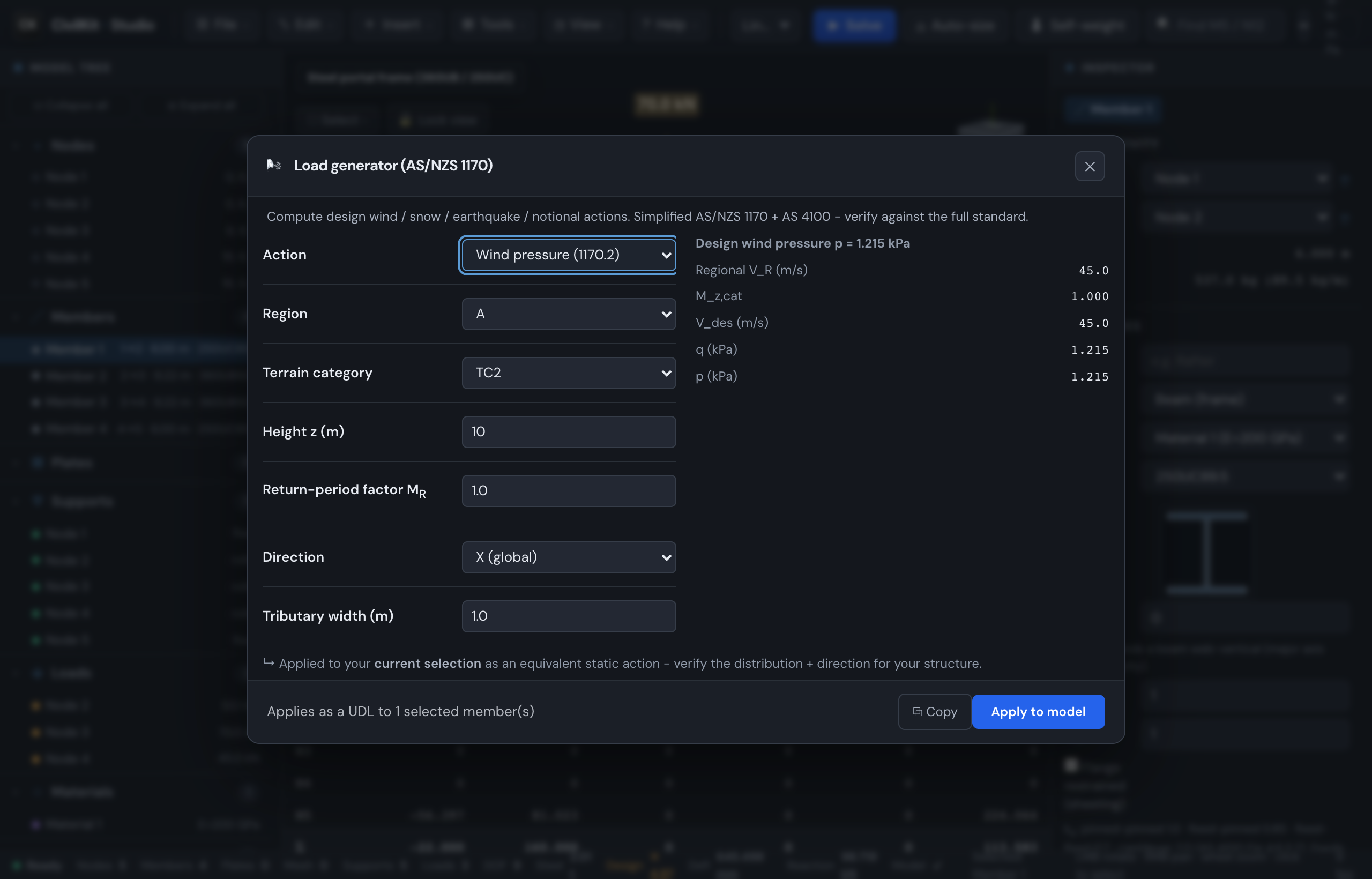
CivilKit Studio turns code parameters - wind region, roof pitch, hazard zone - into real applied loads on your model, so you don't have to hand-calculate a pressure and type it into every member. Compute the action, then apply it to your current selection in a named load case.
All of these tools live in the Tools menu. They are deliberately simplified slices of the standards: a great way to get a defensible first number quickly, but a qualified engineer must confirm every code parameter and the way the load is spread across the structure. The generated loads are an aid, not a substitute for judgement.
Where to find them
Open the Tools menu and pick Load generator (1170)… - the calculator for earthquake and notional actions. It computes the action and (optionally) applies it to the model. Wind is its own item, Tools → Wind loads (1170.2)….
The Load generator dialog has one Action dropdown at the top. Pick the action and the input fields below it change to suit. The right-hand panel shows the working (the intermediate values), and the footer has Copy (copy the result as text) and Apply to model.
Compute first, apply second
You can open the generator purely as a calculator - read the numbers, hit Copy, and close it without touching your model. Apply to model is optional and only lights up once you have the right things selected (see each section below).
Select members with the dialog open
The generator is a non-blocking panel - you can click members (or nodes) in the viewport while it stays open, and the Apply to model button enables and updates its label live as your selection changes ("Applies as a UDL to N selected member(s)"). So there's no need to select first: open it, pick what the load acts on, then apply.
Wind (AS/NZS 1170.2)
Works out a design wind pressure (in kPa) for a given site and height, then can lay it onto members as a line load.
- Tools → Load generator (1170)….
- Set Action to Wind pressure (1170.2).
- Choose the wind Region for your site (A-D for Australia, or the Wn/Wo/Wp/Ws cyclonic-region codes).
- Choose the Terrain category - how rough the ground upwind is, which slows the wind near the ground. TC1 is open water/flat (windiest), TC4 is dense city/forest (most sheltered). TC2 (open country) is the default.
- Enter the Height z - the height above ground (m) you want the pressure at, usually the eaves or ridge.
- Enter the Return-period factor MR - scales the wind speed for the design event's likelihood (1.0 is the usual starting point).
- Read the result on the right: the headline design wind pressure p (kPa) plus the working (regional speed VR, the height/terrain multiplier Mz,cat, design speed Vdes, and the dynamic pressure q).
- To apply it: select the members the wind acts on, set the Direction (X or Z global) and a Tributary width (m) - the strip of wall/roof each member catches - then click Apply to model.
| Input | Meaning |
|---|---|
| Region | Wind region for the site (A-D, or cyclonic Wn/Wo/Wp/Ws) - sets the basic wind speed |
| Terrain category | Ground roughness upwind (TC1 open … TC4 sheltered); reduces speed near the ground |
| Height z (m) | Height above ground the pressure is evaluated at |
| Return-period factor MR | Scales wind speed for the design event's return period |
| Direction | Global axis the line load pushes along (X or Z) - apply only |
| Tributary width (m) | Width of wall/roof feeding each member - converts pressure to a line load - apply only |
The applied load is a uniform line load (UDL) on each selected member, equal to the pressure times the tributary width, into a load case named Wind (AS 1170.2).
Pressure coefficients are on you
This tool gives the site pressure qz·… - it does not apply external or internal pressure coefficients (Cp,e, Cp,i), area-reduction or local-pressure factors, or windward/leeward splits. Decide those from AS/NZS 1170.2 and reflect them in your tributary width, direction and which members you load.
Snow (AS/NZS 1170.3)
Works out a roof snow load (in kPa) from the snow region and the roof slope.
- Tools → Load generator (1170)….
- Set Action to Snow load (1170.3).
- Choose the Region - AU alpine, AU sub-alpine, or NZ low/medium/high.
- Enter the Roof pitch (°) - the roof slope. Steeper roofs shed snow, so the load drops as the pitch rises.
- Read the result: the roof snow load s (kPa) plus the working (ground snow s0 and the roof shape factor μi).
- To apply it: select the roof members, set a Tributary width (m), and click Apply to model. Snow always acts downwards (gravity), so Direction is ignored.
| Input | Meaning |
|---|---|
| Region | Snow region (AU alpine / sub-alpine, NZ low / medium / high) - sets the ground snow |
| Roof pitch (°) | Roof slope; the shape factor reduces the load as the roof steepens |
| Tributary width (m) | Roof strip feeding each member - converts the kPa load to a line load - apply only |
The applied load is a downward UDL on each selected member (snow load times the tributary width), into a load case named Snow (AS 1170.3).
Only one shape factor
The generator uses a single balanced-snow shape factor. Drift, unbalanced loading on asymmetric roofs, and snow sliding onto lower roofs are not modelled - add those load cases yourself if your roof needs them.
Earthquake base shear (AS/NZS 1170.4)
Works out the total horizontal base shear - the sideways force the earthquake puts into the whole structure at ground level - using the equivalent static method.
- Tools → Load generator (1170)….
- Set Action to Earthquake base shear (1170.4).
- Choose the Hazard zone (AU low/medium/high, NZ low/medium/high) - how seismically active the site is.
- Choose the Soil class (A rock … E very soft soil) - soft soils amplify shaking.
- Enter the Period T (s) - the building's natural sway period. Taller/more flexible frames have a longer period.
- Enter Ru (ductility/performance factor) - how much the structure can safely flex and absorb energy; a higher value reduces the design force.
- Enter Sp (structural performance factor).
- Enter the Seismic weight (kN) - the gravity weight that participates in the earthquake (dead load plus a portion of live load).
- Read the result: the base shear V (kN) plus the working (the base-shear coefficient C and V = C·W).
- Set the Direction (X or Y) and click Apply to model. The base shear is distributed up the height as storey forces (AS 1170.4 Cl 6.3, using the period T1 from the working above) and written into a load case typed Seismic (Eu), so the combination generator factors it as earthquake. See Storey distribution below.
| Input | Meaning |
|---|---|
| Hazard zone | Site seismicity (AU/NZ low / medium / high) |
| Soil class | Subsoil A (rock) to E (very soft) - soft soils amplify the shaking |
| Period T (s) | Natural sway period of the structure |
| Ru | Ductility / performance factor - higher reduces the design force |
| Sp | Structural performance factor |
| Seismic weight (kN) | Gravity weight taking part in the earthquake (G + portion of Q) |
| Direction | Global axis the shear acts along (X or Y) - apply only |
When applied, the base shear becomes storey forces in a load case named Seismic (AS 1170.4), typed Seismic (Eu). The selection plays no part: the storeys are read from the node heights.
Notional horizontal forces (AS 4100)
Notional horizontal forces are small sideways forces - a fixed fraction of the gravity load - that AS 4100 requires you to apply to check the frame stays stable even if it is slightly out of plumb. This is a steel-code requirement (AS 4100), not a 1170 action.
- Tools → Load generator (1170)….
- Set Action to Notional horizontal force (AS 4100).
- Enter the Total gravity load (kN) the frame carries.
- Tick Adequately braced if the frame is braced (this changes the fraction used).
- Read the result: the notional horizontal force (kN).
- To apply it: select the nodes, set the Direction (X or Z), and click Apply to model - the force is split equally across the selected nodes.
| Input | Meaning |
|---|---|
| Total gravity load (kN) | The factored gravity load on the frame |
| Adequately braced | Whether the frame is braced - sets the notional fraction |
| Direction | Global axis the force acts along (X or Z) - apply only |
The applied load is split equally across the selected nodes, into a load case named Notional (AS 4100). Notional forces are usually applied in each plan direction in turn, so run it once per direction.
Storey distribution
The Apply button spreads the base shear up the building as storey forces - larger near the top, smaller near the base - the way 1170.4 Cl 6.3 expects. CivilKit.seismicLoads() in the scripting API runs the same distribution.
- The model needs at least two distinct storey levels (read from the node heights). A single-level model is refused with a message.
- The period used is the T1 from the working (typed or computed from kt and hn), so change those before applying, not after.
- The base level carries no force. Each storey's share goes equally to the nodes at that level. A toast confirms how many storeys were loaded and the top-level force.
- Applying again with the same case name adds to the case; delete the loads or the case first to start over. See Loads and Load cases.
Needs real storeys
If the model has fewer than two distinct level elevations, the tool stops - it has nothing to distribute over. It detects levels from node heights about the vertical (Y) axis, so a model that isn't built level-by-level may not split cleanly.
Reading the results and applying to the model
Every generator follows the same pattern:
- The right-hand panel shows the headline action plus the working (the intermediate factors) so you can check each step against the standard.
- Copy puts the result on your clipboard as text - handy for a calc sheet or email even if you never apply it.
- Apply to model only enables when you have the right selection: nodes for the earthquake and notional forces, members for wind and snow. The footer hint tells you what is selected and how the load will be spread.
Each apply creates (or reuses) a clearly named load case - Wind (AS 1170.2), Snow (AS 1170.3), Seismic (AS 1170.4) or Notional (AS 4100) - and makes it the active case. It is a single undoable step, so an unwanted apply is one Undo away.
From there:
- Manage and review the new loads in Loads.
- Bring them into your factored cases with Load combinations.
- Solve and check the effect in Analysis and results.
- For a fuller dynamic treatment, see Dynamic and influence.
Related tools: the per-member design checks and the International steel codes use these loads once they are in your combinations.
Verify before professional use
These generators implement simplified AS/NZS 1170 and AS 4100 methods. Confirm every code parameter (region, terrain, soil, factors), the pressure/shape coefficients the tools do not apply, and the way each action is distributed across your structure, against the full standards before relying on the numbers. They speed up the routine arithmetic - they do not replace the engineer's judgement.