Appearance
The PDF report
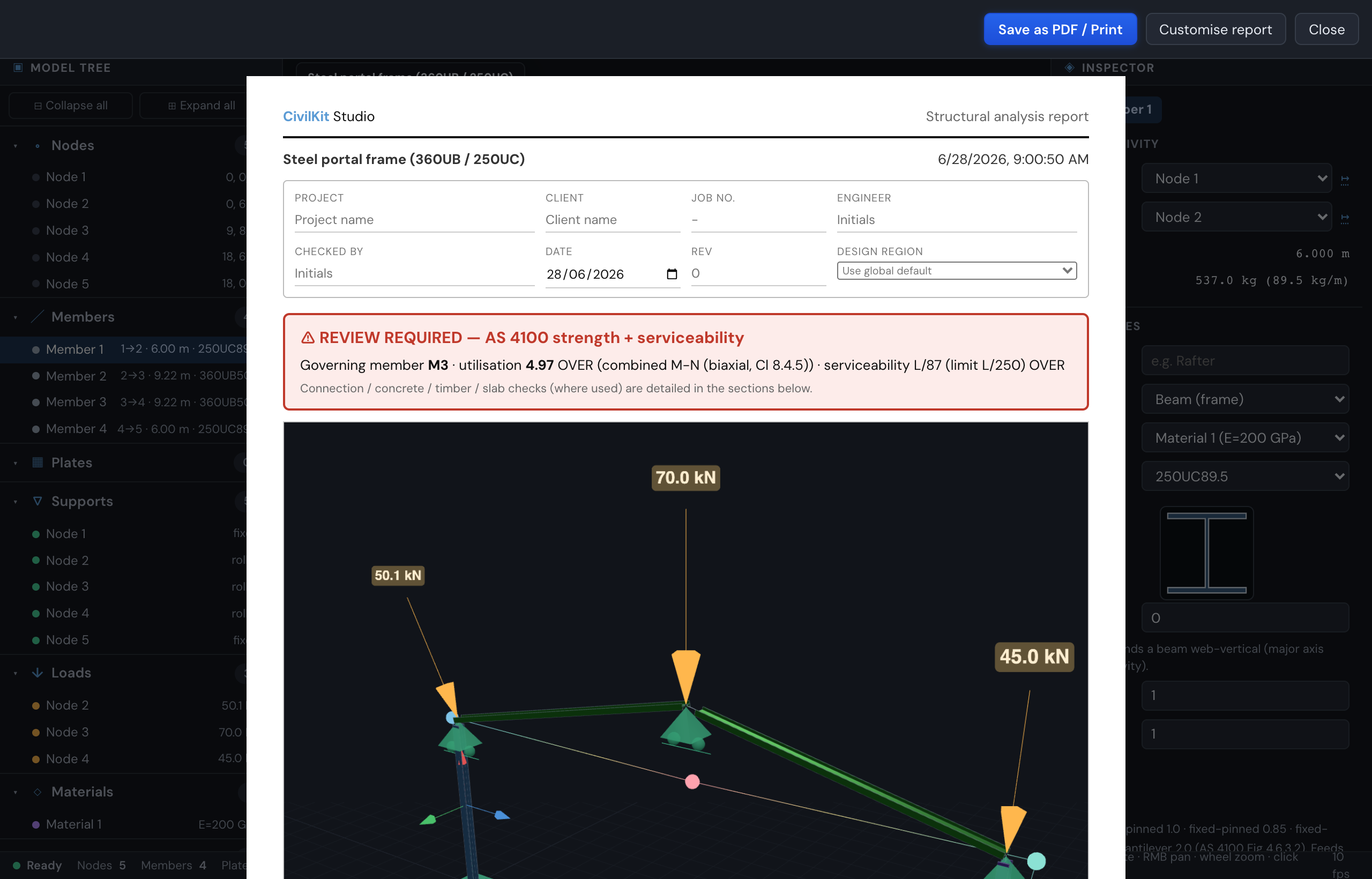
The thing an engineer actually submits is the calc - the clause-by-clause working a checker can audit, not just a pass / fail. CivilKit Studio produces a single printable / PDF calc package that pulls the whole story together: model, analysis, design, connections and quantities.
Generate it
File → Report (or the command palette) opens the printable view; use your browser's Print → Save as PDF to export it. The filename is derived from the title block, so a saved PDF is meaningfully named.
Firm branding
The report carries your firm's identity, not the app's. In Report → Customise → Company & branding set your company name, an optional address, a logo (uploaded once, stored on your machine and reused across every project), and a credential label. The header then shows your name and logo in place of the default. The credential label is free text - type whatever your jurisdiction uses (RPEQ, CPEng, PE, CEng, ...); nothing is hard-coded to one country.
Title block, sign-off & revisions
No calc submits without a title block. The page carries an editable:
- title block - project, client, job number, and the per-project design region (which sets the design code the report cites);
- sign-off table - Prepared / Checked / Approved rows, each with a name, a registration number (labelled with your firm's credential label), and a date;
- revision history - add / remove rev · date · description · by rows; the latest revision is carried as the document revision.
Everything you type is saved with the model, so it travels through export, the share link and autosave.
What it includes
The page assembles only the sections that apply to your model:
- Model overview & steel take-off - the same live overview / take-off from the Summary tab: counts, and steel grouped by section with the grand-total tonnage. If any members sit on a section with no catalogue mass, the total notes how many were excluded - so the take-off is never silently partial.
- Detailed member calculations (AS 4100) - one compact, clause-referenced block per checked member:
- section classification + flange / web slenderness (Cl 5.2);
Ze,φMsx = φ·fy·Zex(Cl 5.2.1);φMbx = αm·αs·φMsxwithαm,αs,Leshown (Cl 5.6.1.1);φNcwithkf,λn,αc(Cl 6.3.3);φNt(Cl 7.2);φVv(Cl 5.11);- the design actions
M*x / M*y / N* / V*and the governing utilisation (Cl 8.3/8.4), highlighted green / red.
- Serviceability - the worst-member deflection ratio against the configured limit, e.g. "1/108 (limit L/250 OVER)" - a self-explaining line, not a bare number. See Design checks.
- Connection design - base-plate, fin-plate and end-plate connections (connections) with bolts, plate size, design action, component utilisations and the governing verdict.
- Concrete & composite - RC members, RC slab strips (AS 3600) and composite beams (AS 2327), shown when present. See Concrete & composite.
- Footing schedule - when the Footings workspace has designed footings, the report includes a schedule listing each footing type (pad, combined or strip), its size, the number of supports it covers, and the governing check. This is the same schedule visible in the results drawer, pulled into the submitted package so the reader knows what is being built and where.
- Design calculations - results sent from the standalone calculators (footing, site classification, retaining wall, wind) via their + Add to report button. Each appears as a card naming the standard it used, its inputs and results - so a real calc reaches the submitted package with no re-typing.
- Quantities - concrete volume (gross geometry:
b·D·Lfor RC members, plan-area × thickness for slabs) plus an estimate of the designed main reinforcement. It is deliberately labelled an estimate - it excludes stirrups, laps, cover, wastage and secondary steel, and is not a bar-bending schedule. Renders only when the model has RC members or slabs. - General notes - an editable, numbered notes block that seeds sensible defaults for your project's design region (materials, dimensions, verify-on-site, and the code the job is designed to). Edit them in the section itself, one note per line.
Report Designer
The report is not fixed - the Report Designer lets you choose what goes in, in what order, before printing. Alongside section toggles and ordering it adds:
- Result scope filter - pick exactly which solved load cases, combinations or envelope appear in the report. Tick All for every solved case, or select a subset; the result tables and force diagrams iterate only over that scope. An empty selection falls back to all, so the results section is never blank.
- Envelope results - a section that scans the scoped combinations and reports the worst action across them per member / node, with the governing combo named beside each value. The fast way to a one-page "design envelope" summary.
- Max / min highlighting - in the result and reaction tables each column's maximum is highlighted red and its minimum green, so the controlling values jump out without reading every row.
- Equilibrium check - sums the applied loads against the support reactions on each global axis and prints the residual with a pass / fail verdict, an at-a-glance confirmation the solve balances.
Presets
A preset is a one-click starting point - apply one, then fine-tune the sections:
| Preset | What it builds |
|---|---|
| Full report | Every section, with a table of contents and all force diagrams |
| Council submission | Every section, full steel-design working + governing diagrams, table of contents |
| Internal check | Just verdict, analysis summary, results (summary) and steel design (governing) |
| Loads & model | Model image, materials, sections, members, take-off and loads - no analysis |
| Analysis + graphs | Verdict, model image, results, force diagrams, utilisation chart and contour |
Section order and detail levels
Drag sections to reorder them, tick to include / exclude, and for the longer sections choose a detail level: results Summary vs Full, steel design Governing (the worst member of each section group) vs Full (every member), and force diagrams Governing vs All. Turn the table of contents on for long reports. Your configuration is saved with the model.
Single source of truth
Every design section re-runs the same calc the inspector uses at print time, so the submittable PDF and the on-screen panels can never disagree. All dynamic values are HTML-escaped.
Stale-results banner
The report prints a warning when the model has changed since the last solve. If you edit geometry, loads or assumptions after solving, the FEM-derived numbers in the report may be out of date. Re-solve before printing to clear the banner.
Verification & the submission gate
Calculators that are still verified: false (the footing, site-class, retaining and wind calcs are transcribed from the standard but not yet independently signed off) carry an amber caution on their card in the report. If any unverified calculation is included, the report also stamps a loud, printed PRELIMINARY banner at the top that lists them by name - so an unverified number can never be issued for construction or certification without it being obvious. Verify each against the standard, and treat the banner as a hard gate until your own sign-off replaces it.
Other exports
The PDF is one of several ways out of a model:
- Save image (PNG) - the current 3D viewport (deformed shape, force diagrams, utilisation contour) for a calc package or email.
- Copy table (TSV) - any results table straight into a spreadsheet.
- Export JSON - the full model.
- Copy share link - the whole model packed into a URL. See Share a model by link.
Certificate page
The report can carry a draft of the jurisdiction's own certificate, filled from the title block, the design criteria and the code map: the Engineering NZ PS1 for a New Zealand job, Queensland's Form 15 or the NSW Design Compliance Declaration for an Australian one, the IStructE design statement for the UK, and a sealed cover sheet for the US. Turn it on in the report designer (section "Certificate page"; the Council submission preset includes it) and pick the form under its level, or leave it on auto. Every page says it is a draft: the report supplies the answers, the declaration is made on the official form by the engineer named.